BillKit is a macOS app designed to make expense tracking effortless. Instead of manually typing in every detail from your invoices, BillKit uses artificial intelligence (AI) to automatically extract information from your invoice files whether they're PDFs, images, or scanned documents.
Think of it as your personal assistant that:
- Reads your invoices for you
- Extracts vendor names, amounts, dates, and line items
- Organizes everything into searchable expense records
- Lets you track spending across multiple businesses
Why use BillKit?
- AI-Powered Extraction
Stop typing invoice details manually. BillKit's AI (Claude or OpenAI) reads your invoices like a human would, extracting all key information in seconds. - Privacy First
All expense data stays on your Mac. No cloud storage for your financial records. Invoice files are sent only to your chosen AI provider for processing. - Multi-Currency Ready
Track expenses in any currency. Each expense is stored in its original currency with dashboard conversions for analysis. - Beautiful Dashboard
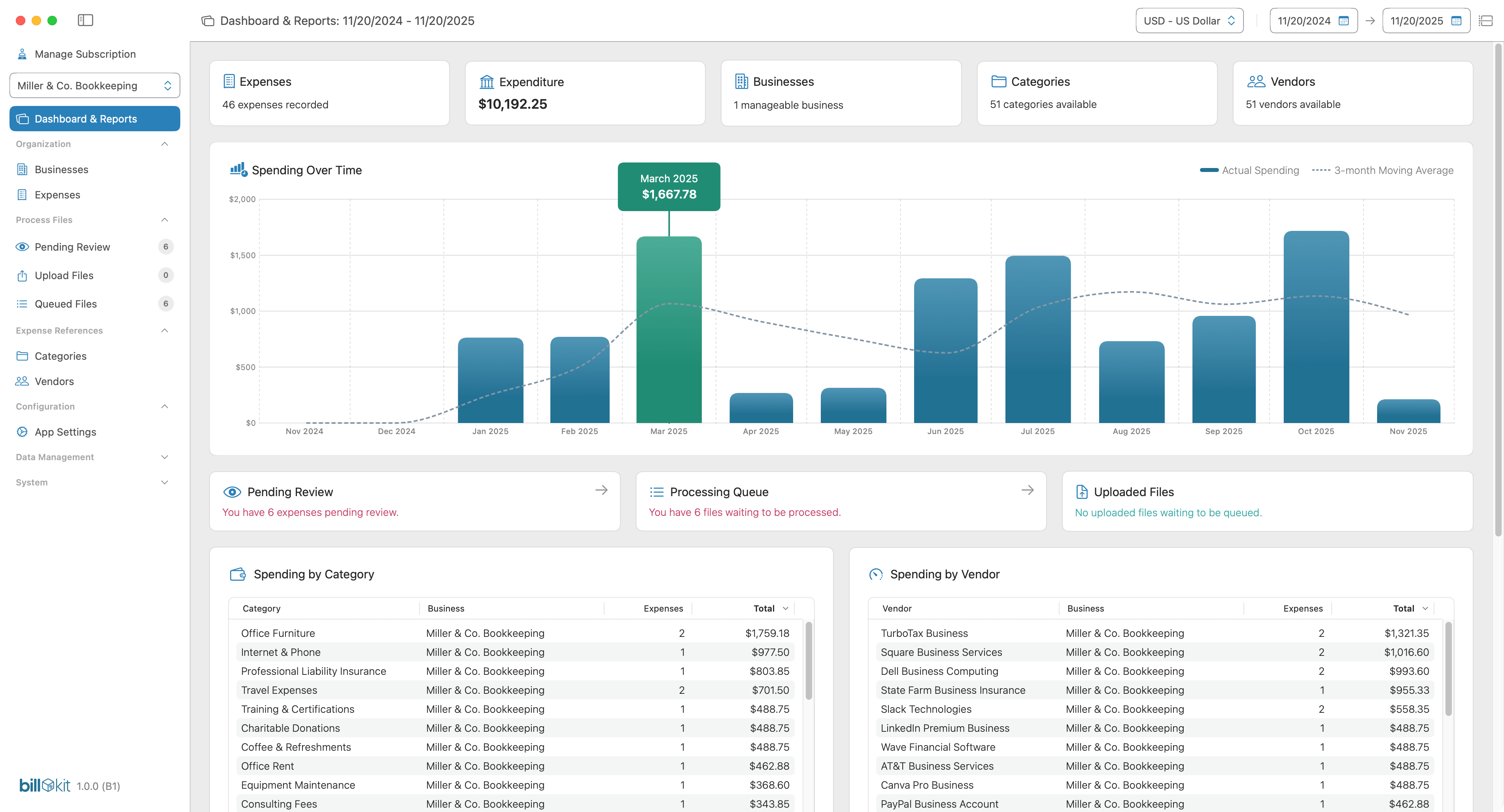
Visual spending trends, top categories, top vendors, and activity feeds help you understand where your money goes without spreadsheet headaches. - Export-Ready
Generate clean CSV or JSON exports for your accountant or tax software in seconds. Include invoice files for complete record-keeping.
How BillKit Works
Getting started with BillKit is straightforward:
- Set up your AI provider
Choose Claude (Anthropic) or OpenAI and add your API key. Both offer free credits to start. - Upload your invoices
Drag and drop PDFs, photos, or scanned documents into BillKit's upload queue. - Let AI extract the data
Process files individually or in batches. AI reads each invoice and extracts vendor, amount, date, tax, and line items automatically. - Review as needed
Check records flagged as pending review, making any corrections as required. Your expense is logged and ready for reporting. - Track and export
View spending insights on your dashboard or export data for tax filing and accounting software.
No typing vendor names, no hunting for totals, and no manual spreadsheet updates required.
Who Uses BillKit
Freelancers & Sole Traders
Track business expenses automatically with organised records ready for Self Assessment tax returns.
Small Business Owners
Monitor supplier invoices, categorise spending, and keep books ready for your accountant without manual data entry.
Portfolio Entrepreneurs
Manage multiple businesses with complete separation by storing different categories, vendors, and expenses for each venture.
Consultants & Contractors
Process client expenses and project costs efficiently with accurate, AI-extracted financial records.
Anyone Managing Business Expenses
Stop wasting time on invoice data entry and start spending time on work that actually grows your business.
Key Features at a Glance
AI Invoice Processing
BillKit sends invoice files to your chosen AI provider (Claude or OpenAI) for automatic data extraction. Vendor details, amounts, dates, tax breakdowns, and line items are read and returned in 2-7 seconds per invoice.
Confidence Scoring
Every AI extraction includes a confidence score (0-100%) showing how certain the AI is about the data. Invoices scoring below your set percentage (60% as default) are automatically flagged for manual review, giving you speed without sacrificing accuracy.
Multi-Business Support
Pro tier supports unlimited businesses, perfect for portfolio entrepreneurs or consultants managing client projects separately. Each business has its own vendors, categories, expenses, and invoice files, completely separated for clean accounting.
Multi-Currency Handling
Track expenses in any global currency. Each expense is stored in its original currency. The dashboard converts everything to a common currency for analysis.
Smart Categories & Vendors
Create custom categories that match your tax return requirements. BillKit's AI suggests categories automatically based on invoice content and learns from your corrections.
Visual Dashboard
See spending trends over time, top categories by amount, top vendors by spend, and recent activity. Filter by date range, track fiscal years, and make informed decisions about your finances.
Professional Exports
Generate reports in CSV (for spreadsheets and accounting software) or JSON (for integrations). Export expenses, categories, vendors, and audit logs. Pro users can bulk export invoice files as ZIP archives.
Complete Privacy
100% local storage using Core Data. Your expense data, categories, vendors, and settings never leave your Mac. Invoice files are sent only to your chosen AI provider for processing. No BillKit cloud servers, no accounts required.
System Requirements
- macOS 14.6+ (Sonoma) or later
- Approximately 500MB of free disk space (more if storing many invoice files)
- Internet connection required for AI processing and subscription verification
- API key from Claude (Anthropic) or OpenAI for invoice processing
- Optimised for Apple Silicon, fully compatible with Intel Macs
Quick Start
Ready to begin? Setup takes about 5 minutes:
- Download and install BillKit
- Create your first business
- Get an API key from Claude or OpenAI
- Enter your API key in BillKit's settings
- Upload your first invoice and watch AI extract the data
For detailed setup instructions, see the Getting Started Guide.
Why Choose BillKit?
Privacy You Can Trust
Your expense data stays on your Mac. No cloud servers storing your financial records. Invoice files are sent only to your chosen AI provider for processing. You maintain complete control.
AI That Actually Works
90%+ accuracy on standard invoices. Confidence scoring flags uncertain extractions for review. You get automation without blindly trusting AI.
Free to Start
Basic tier is genuinely free forever: 1 business, 10 vendors, 5 categories, 25 expenses per month. No credit card required. Upgrade to Pro (£2.99/month) only when you need unlimited everything.
Built for Simplicity
Unlike bloated accounting software designed for enterprise, BillKit does one thing well: upload invoices, extract data, track spending. No feature creep, no complexity.
AI Processing Costs
BillKit itself is free to start (or £2.99/month for Pro). AI processing is pay-as-you-go through your chosen provider:
- Each invoice costs approximately £0.01-£0.02 to process
- Cost varies based on file size, page count, and complexity
- For 50 invoices per month, expect £0.50-£2.00
- Both Claude and OpenAI offer free credits when you sign up
You pay your AI provider directly. BillKit simply sends the invoice files and receives the extracted data.
Explore the Docs
New to BillKit?
-
Getting Started Guide
Installation, setup, and processing your first invoice -
Managing Businesses
Creating and organising business entities -
FAQ
Common questions answered
Ready to dive deeper?
-
AI Invoice Processing
How automatic extraction works and choosing AI providers -
Category Management
Organising expenses by category -
Vendor Management
Organising expenses per supplier -
Dashboard & Reports
Understanding spending insights and analytics
Advanced features
-
Exporting Data
CSV and JSON exports for accounting software -
Subscription Guide
Basic vs Pro tiers, limits, and billing -
Audit Logs
Tracking changes for compliance
Need help?
-
Troubleshooting
Solutions for common issues -
Data Management
Backups, storage, and data ownership -
Contact Us
For support, feedback, feature requests, and bug reports