>

Contact

We're here to help, so reach out when you're ready.

>

General Enquiries

Have questions about BillKit's features, pricing, or how the app works? Need information about system requirements or compatibility?

Whether you're a potential user exploring what BillKit can do or just curious about AI-powered expense tracking, we're here to help with any general questions you may have.

info@billkit.app

App Support

Experiencing issues with BillKit or need help getting the most out of the app? With real human support, we'll 'help you troubleshoot problems, understand features, and optimize your expense tracking workflow.

We respond to all support requests with practical solutions within 48-72 hours.

support@billkit.app

Bug Reporting

Found something that isn't working as expected? Whether it's a crash, incorrect invoice extraction, or a feature that's misbehaving, we want to know about it.

Please include details about what happened, what you expected to happen, and your macOS version so we can investigate and fix the issue quickly.

bugs@billkit.app

Feedback & Features

Have ideas for new features, suggestions for improvements, or thoughts on how we could make BillKit better? Fantastic! Your input directly shapes BillKit's development.

We actively consider user feedback when planning updates and love hearing how you'd like to see the app evolve. Share your ideas, use cases, or feature requests.

feedback@billkit.app
>
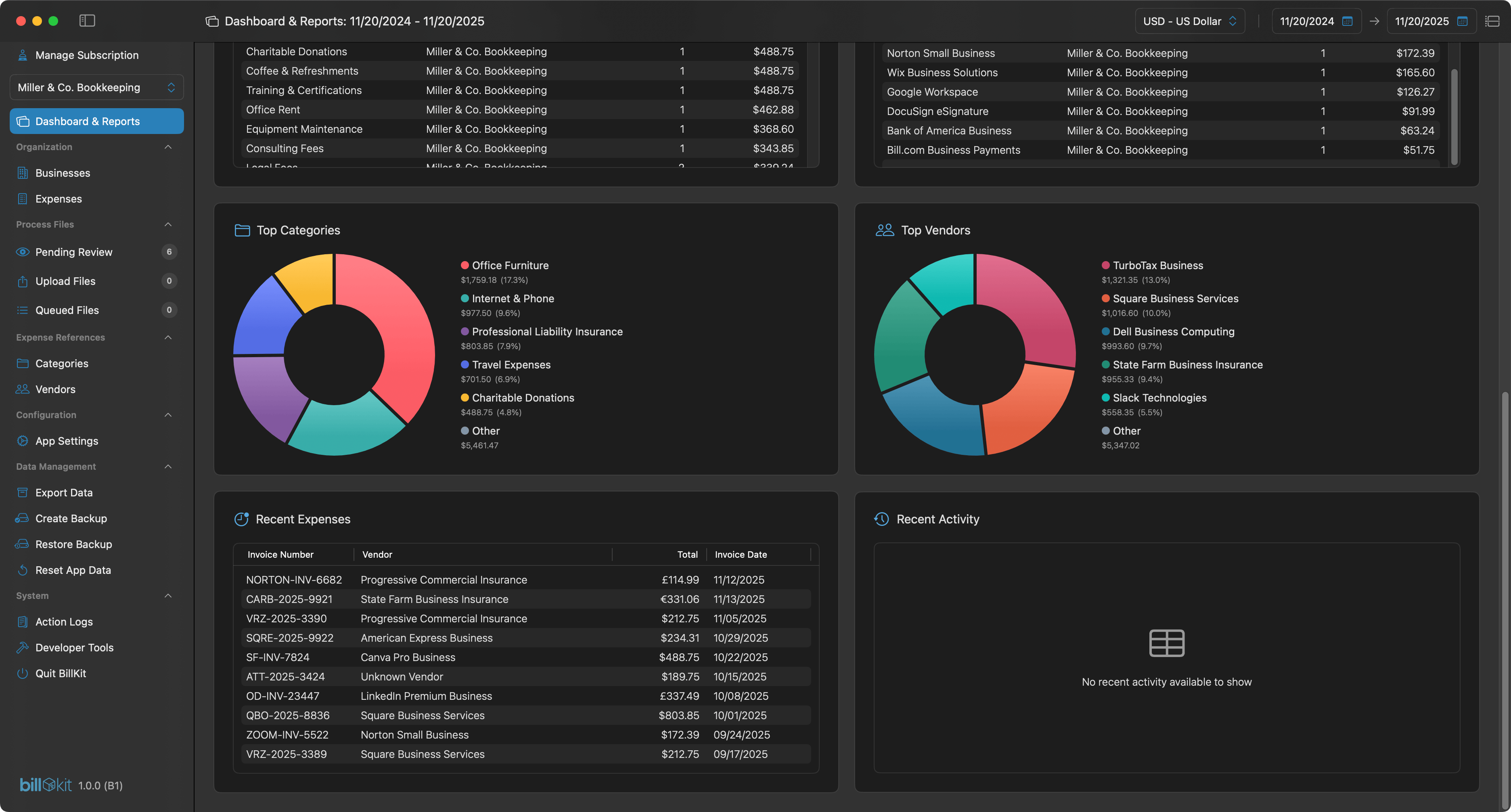
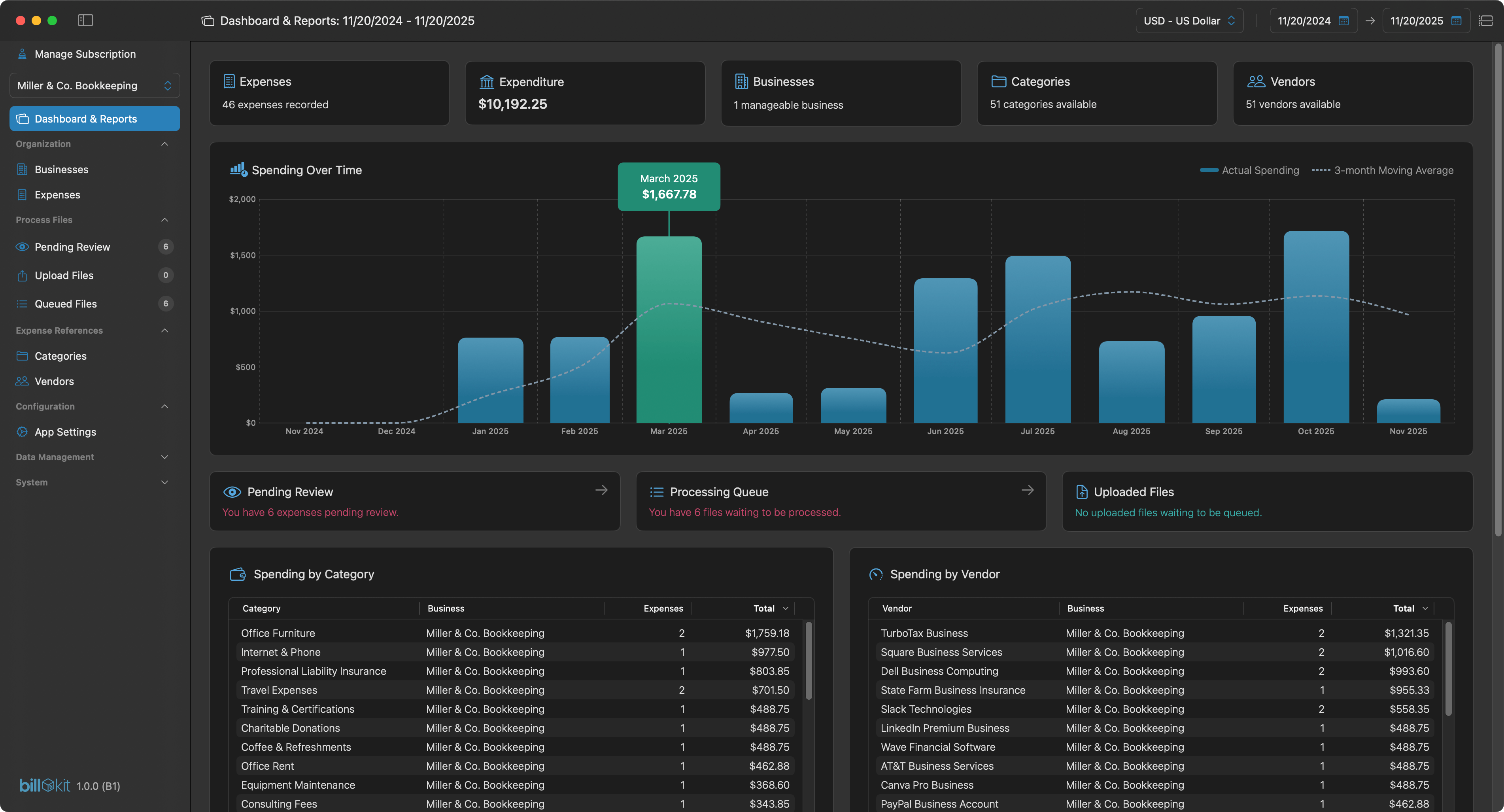
BillKit app dashboard

Reclaim Your Weekends.
Automate The Busywork

AI-powered expense tracking for Mac. Upload PDFs and photos, process, done. Start tracking smarter today!

AI Powered
Privacy-first
Reporting
Exporting
MacOS 14.6+
BillKit Dashboard main screen
>

Common Questions

We've got you covered. Quick answers to help you get started.

What is BillKit?

BillKit is AI-supported expense tracking software for macOS that automatically extracts data from your invoice files. Instead of manually typing vendor names, amounts, and dates, you simply upload PDFs or photos and let AI do the heavy lifting.

It's designed for freelancers, sole traders, and small business owners who need efficient expense management without the complexity of enterprise accounting software.

What do I need to get started?

You'll need a Mac running macOS 14.6+ (Sonoma) or later, about 500MB of free disk space. While you can add expenses manually, you'll need an API key from either Claude (Anthropic) or OpenAI to use AI powered invoice data extraction features.

Both providers offer free credits when you sign up, so you can test BillKit's AI invoice processing without any upfront costs. Setup takes about 5 minutes.

How much does BillKit cost?

BillKit's Free tier is genuinely free forever - no credit card required, no surprise charges, no trial period that expires. You get 1 business, 10 vendors, 5 categories, and 25 expenses per month.

Great for freelancers and small business owners. When you need more capacity, BillKit Pro offers unlimited everything with monthly billing at £2.99 per month.

Can BillKit process multiple invoices?

Yes! Upload multiple files to BillKit's queue and process them all at once OR one by one - your choice! Perfect for month-end bookkeeping sessions when you have a stack of invoices waiting.

Just drag and drop all your files, and let AI work through the batch. You'll see them get processed in real-time. If any fail, you can retry them again anytime.

How much does AI processing cost?

AI processing is pay-as-you-go through your provider (Claude or OpenAI). Each invoice typically costs £0.01-£0.02 to process, depending on file size, number of invoice pages in the file and it's complexity.

For 50 invoices per month, expect £0.50-£1.00. Both providers offer free credits when you sign up, giving you plenty of runway to test BillKit before paying anything.

Does BillKit integrate with Xero or QuickBooks?

Not directly, but BillKit exports all your data to CSV and JSON formats that accounting software can import. Export your expenses, categories, and vendors with all details and import the files into any accounting platform that accepts CSV formats.

Due to the number of accounting platforms globally, you may need to map the columns to match your accounting software's import requirements manually.

What reporting does BillKit have?

BillKit's dashboard shows spending trends over time, top categories by amount, top vendors by spend, and recent activity. Filter by date range (last 7 days, fiscal year, custom periods) and currency to analyse exactly what you need.

For deeper analysis, you can export all your data to CSV or JSON and create custom reports in Excel or Google Sheets.

Does BillKit store data in the cloud?

No. BillKit is a fully local macOS application. Everything stays on your Mac: the database, invoice files, categories, vendors, and settings.

This gives you complete control and eliminates concerns about data breaches, third-party access, or subscription-dependent data access. Your data is yours, period.

Have a question not answered here? Try our other help sections below.

>
>